Lifetime · TradingView indicator
Apex Intraday Flow Pro: a TradingView indicator for day trading on 1-minute to 1-hour charts
Apex Intraday Flow Pro is an intraday execution suite for TradingView. It combines a 50-bar trend read, VWAP bias, volume-spike confirmation and ATR-scaled stop-loss and profit targets in one real-time HUD, so you can see the bias, the trigger and the risk plan before you take a trade.
$200 one-time
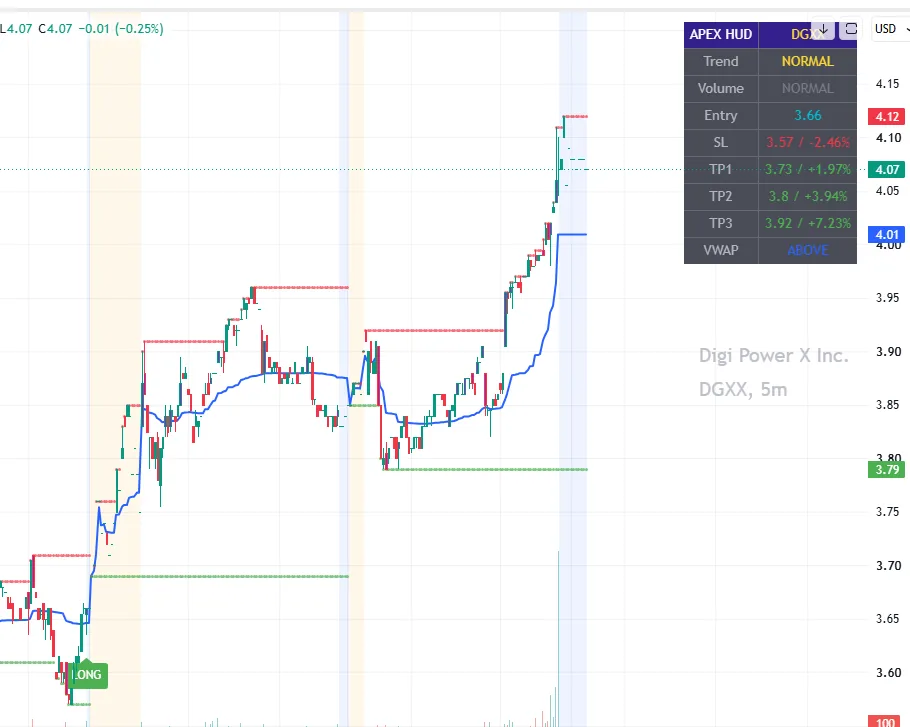
Apex Intraday Flow Pro at a glance
- Platform
- TradingView (desktop & mobile)
- Best timeframes
- 1m, 3m, 5m up to 1h
- Signals
- LONG & SHORT on bar close
- Risk levels
- Entry, SL, TP1, TP2, TP3
- Price
- $200 one-time, no monthly fee
See Apex Intraday Flow Pro in action
Videos are historical chart replays for illustration only and do not guarantee future results.
Why it exists
The problem Apex solves for intraday traders
On fast 1-minute to 5-minute charts, the biggest enemies are conflicting timeframes and second-guessing during volatile sessions. Most traders end up stacking five indicators, reading them one by one, and entering late.
Apex puts the inputs that matter for an intraday decision (trend, VWAP position, volume state and the risk plan) into a single HUD in the top-right corner of the chart, without covering price action.
HUD dashboard breakdown
What each line of the Apex HUD means
- APEX HUD / Ticker
- Shows the suite title alongside the active chart symbol.
- Trend
- Evaluates momentum over the last 50 bars and reads BULLISH, BEARISH or NORMAL.
- Volume
- Classifies current volume as SPIKE LONG (purple volume candle), SPIKE SHORT or NORMAL.
- Entry
- Records the signal price when a confirmed signal prints. Your actual fill may differ.
- SL
- Projects the stop-loss boundary with the live percentage risk, e.g. 150.25 / -2.1%.
- TP1 · TP2 · TP3
- ATR-scaled profit targets with live percentage gain, e.g. 155.00 / +3.2%.
How to use the three profit targets
- TP1 – the close, conservative target for taking initial profit and moving toward break-even.
- TP2 – the intermediate target for capturing the main continuation of the move.
- TP3 – the extended target for strong intraday runners.
Long setup
How to take a LONG trade with Apex
1. Confirm the bias
The HUD shows a BULLISH trend and price is ABOVE VWAP.
2. Wait for the trigger
A green LONG label prints together with a purple volume-spike candle and the SPIKE LONG state.
3. Execute the plan
Use the HUD entry and stop-loss values, then scale out across TP1, TP2 and TP3.
Short setup
How to take a SHORT trade with Apex
1. Confirm the bias
The HUD shows a BEARISH trend and price is BELOW VWAP.
2. Wait for the trigger
A red SHORT label prints with a purple volume-spike candle and the SPIKE SHORT state.
3. Control the risk
Enter at the HUD value, place the displayed stop immediately and manage profits through TP1–TP3.
Why VWAP is the main directional filter
VWAP (Volume Weighted Average Price) is the benchmark many intraday participants measure their fills against. When price holds above VWAP, buyers are in control of the session; when it trades below, sellers dominate.
Apex is built around one simple rule: don't force counter-trend trades against the VWAP bias.
Built into the workflow
Five rules for trading with Apex
- Never fight the VWAP – avoid longs below it and shorts above it.
- Respect the spikes – prioritize signals confirmed by a purple volume spike; non-spiked signals carry more risk of false breakouts in low-liquidity hours.
- Define risk first – place the stop-loss immediately on entry and take partial profit at TP1.
- Discipline over emotion – let the ATR-scaled targets guide exits instead of fear or greed.
- Align timeframes – make sure your execution timeframe (1m, 3m, 5m) agrees with your higher-timeframe bias.
Apex Intraday Flow Pro on real charts
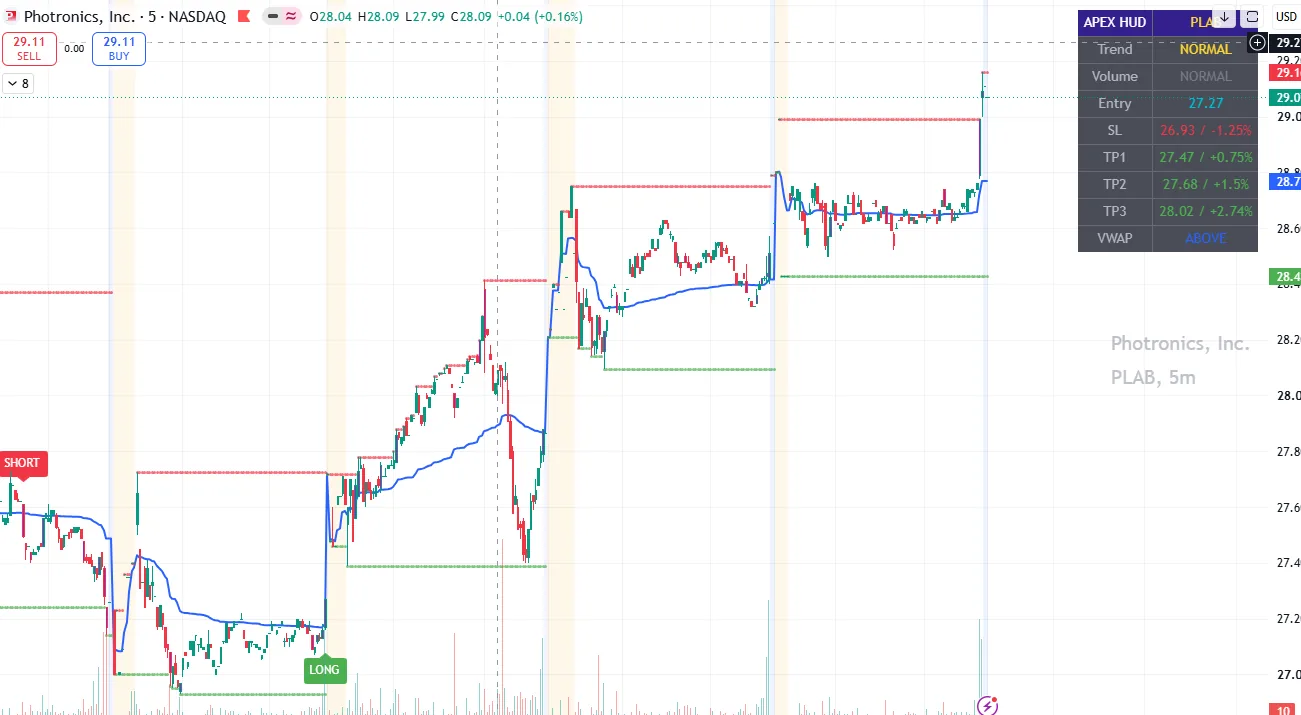
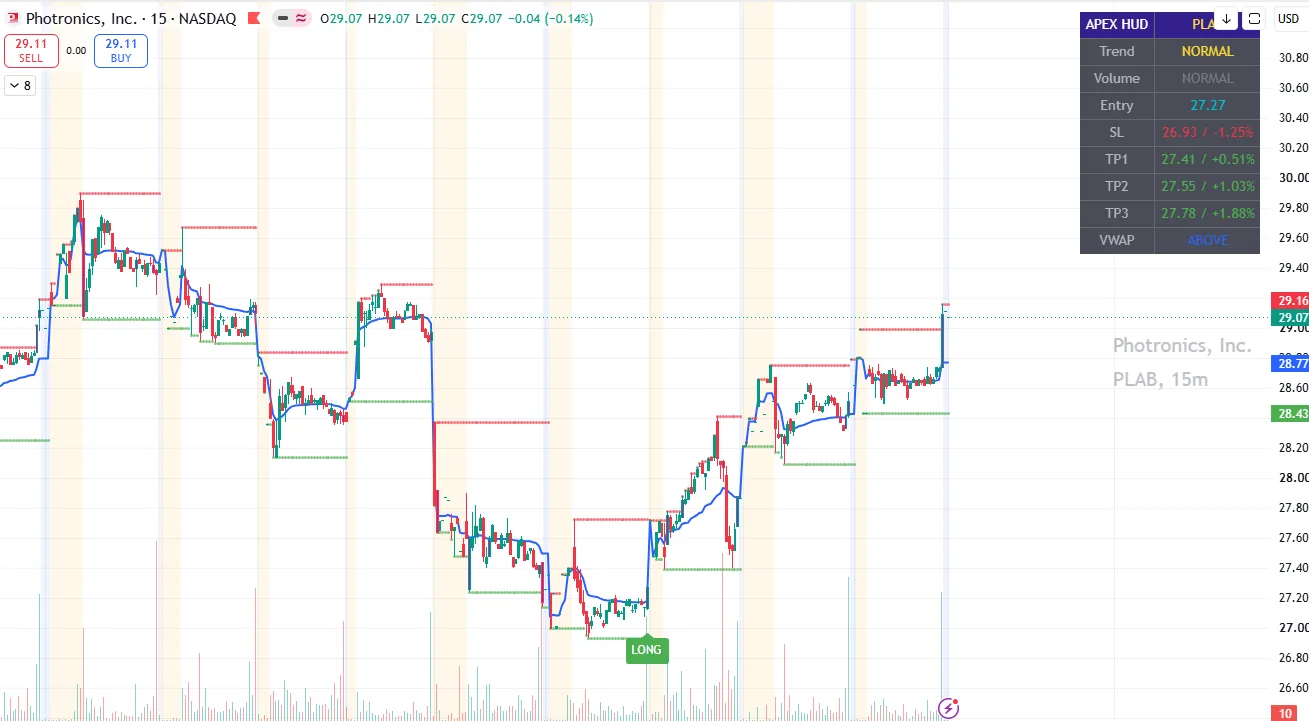
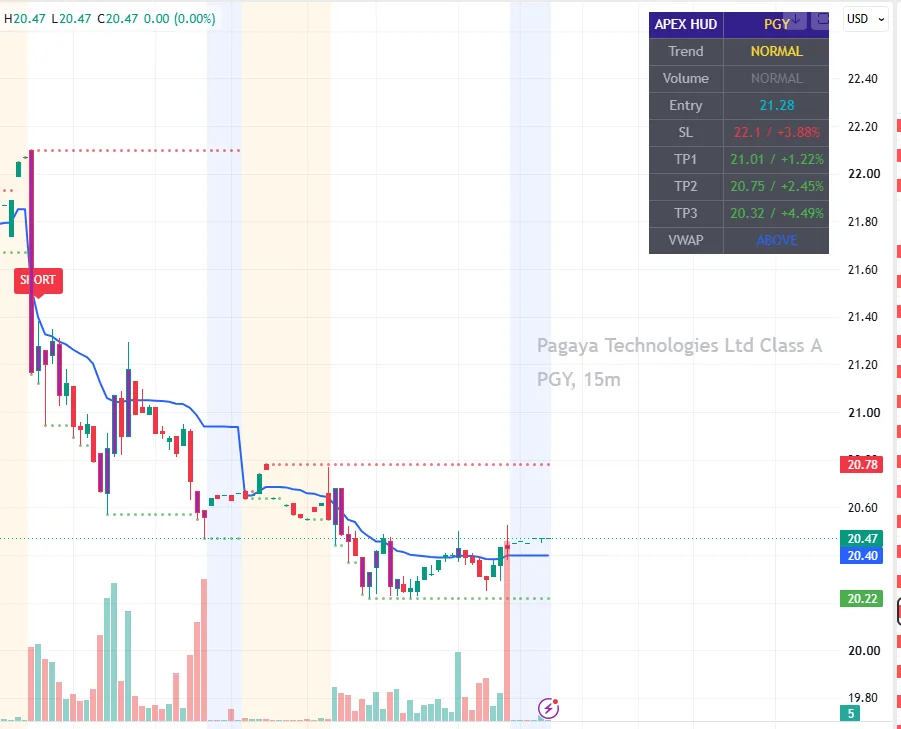
Chart examples show historical output for illustration only and do not guarantee future results.
Apex Intraday Flow Pro is a good fit if…
- You day trade stocks, indices or crypto on 1m–1h charts
- You want a defined stop-loss and staged targets on every setup
- You prefer a one-time payment over a subscription
It's probably not for you if…
- You hold positions for weeks – the Ultimate Dashboard fits better
- You want automated trading or a bot – Apex is a decision-support tool
- You expect guaranteed results – no indicator can offer that
Getting started
How to add Apex Intraday Flow Pro to TradingView
1. Create a free TradingView account
If you don't have one yet, open a free account on TradingView. The indicators run on TradingView in the browser, desktop app and mobile app.
2. Complete checkout and share your username
After checkout, access is granted to your TradingView username. Make sure the username you provide is spelled exactly as it appears on TradingView.
3. Add the indicator to your chart
Open any chart, click Indicators and search for the indicator by name (it also appears under Invite-only scripts). The default settings are the recommended starting point.
4. Not showing up? Contact support
Send your exact TradingView username to support by email or Telegram and access will be checked, usually within 24 hours.
Apex Intraday Flow Pro FAQ
What timeframe is best for Apex Intraday Flow Pro?
Apex is designed for intraday charts: 1-minute, 3-minute and 5-minute charts, and up to the 1-hour chart. Make sure your execution timeframe agrees with your higher-timeframe bias.
Is Apex Intraday Flow Pro a subscription?
No. Apex is a one-time $200 payment with lifetime access and no monthly fee.
Does Apex give a stop-loss and take-profit?
Yes. When a confirmed signal prints, the HUD shows the entry price, a stop-loss level with percentage risk, and three ATR-scaled targets (TP1, TP2, TP3) with percentage gain.
Does Apex send push alerts?
No, and that is intentional. Apex is built for traders who read the chart and make the decision themselves, rather than reacting to notifications.
Do Apex signals repaint?
Signals are calculated on the confirmed bar close and do not change after the candle closes. Data-feed corrections from third-party providers can occasionally affect historical bars.
Ready to try Apex Intraday Flow Pro?
$200 one-time payment with lifetime access and no monthly fee.
Compare with our other indicators
Risk disclosure: Trading financial instruments involves significant risk and is not suitable for every investor; you could lose all of your capital. Universal Indicator tools are analytical aids for educational purposes, not financial advice, and do not guarantee profits. Past performance and chart examples do not indicate future results. Read the full disclosure and terms.